BUSINESS PROCESS AUTOMATION (BPA) EXPLAINED
Bottlenecks do not just happen on the factory floor; they can also happen in the office environment. Tasks that take up massive amounts of manual handling, that are low value and error-prone are perfect for automation.

The key elements to identify a process for automation are:
- The process requires consistency.
- The process is repeatable.
- The process needs to be free from error, every time.
With your processes more streamlined you can not only save money by reducing the manual handling aspect, best practices can also be ensured, so operating efficiency will improve overall.
Tasks will be error-proof and transparent, freeing up staff and taking the onus off them, on your repetitive ‘thankless tasks’.
Here’s a simple introduction to the tech you can leverage to improve your efficiencies:
MS Power Automate
The immediate thing to note here is that there is no necessity to have Dynamics 365 as your CRM platform to be able to take advantage of what Power Automate can do. This makes it ideal for SMB’s to streamline processes.
All your repeatable day to day, or month to month, data gathering tasks can be run by Power Automate, which will gather the data, with results accessed in near real-time on one dashboard.
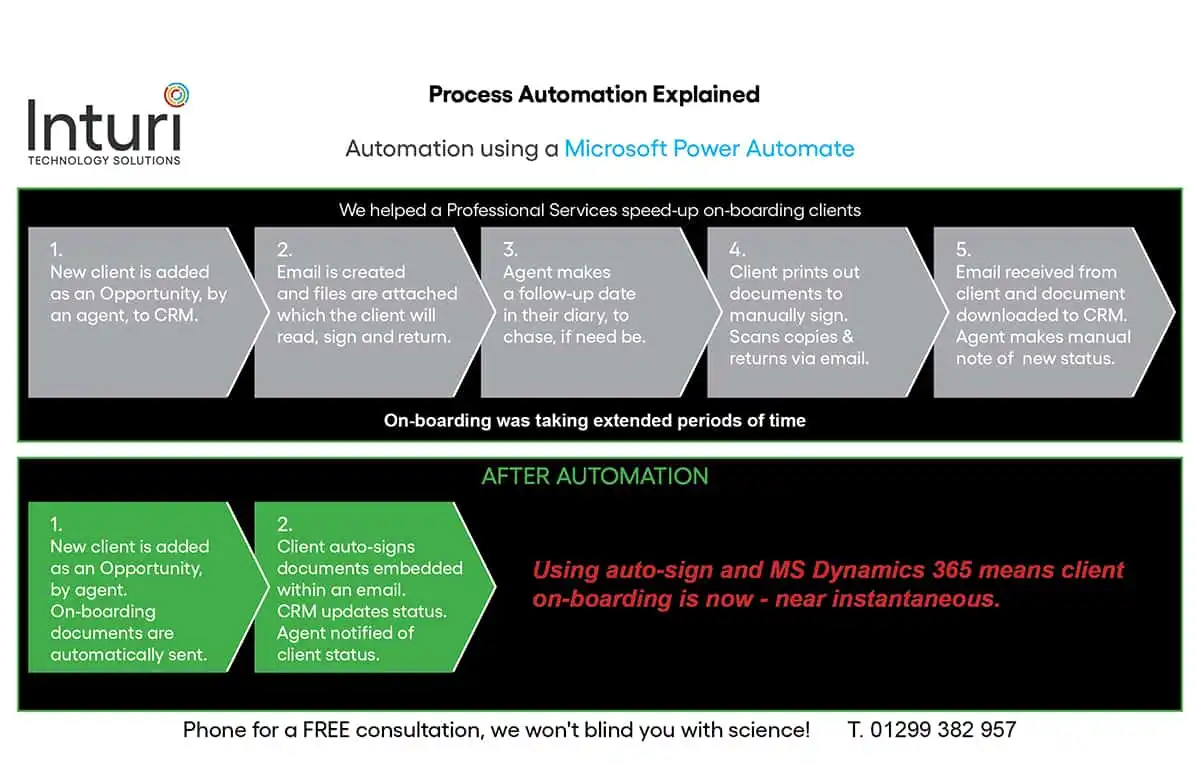
Onboarding a client
The diagram outlines the steps taken to onboard a client before and after automation. Ordinarily, it would take five steps and could take extended periods of time as it relied on the client printing off the document and signing it. With Power automate it is completed in two steps.
MS Power App’s
These can be created for all aspects of your business. We will work with you to ascertain the processes that would be most suited to a specifically designed Power App. We recently created a Microsoft Power App for a Logistics company that removes the necessity for Spreadsheet use altogether.
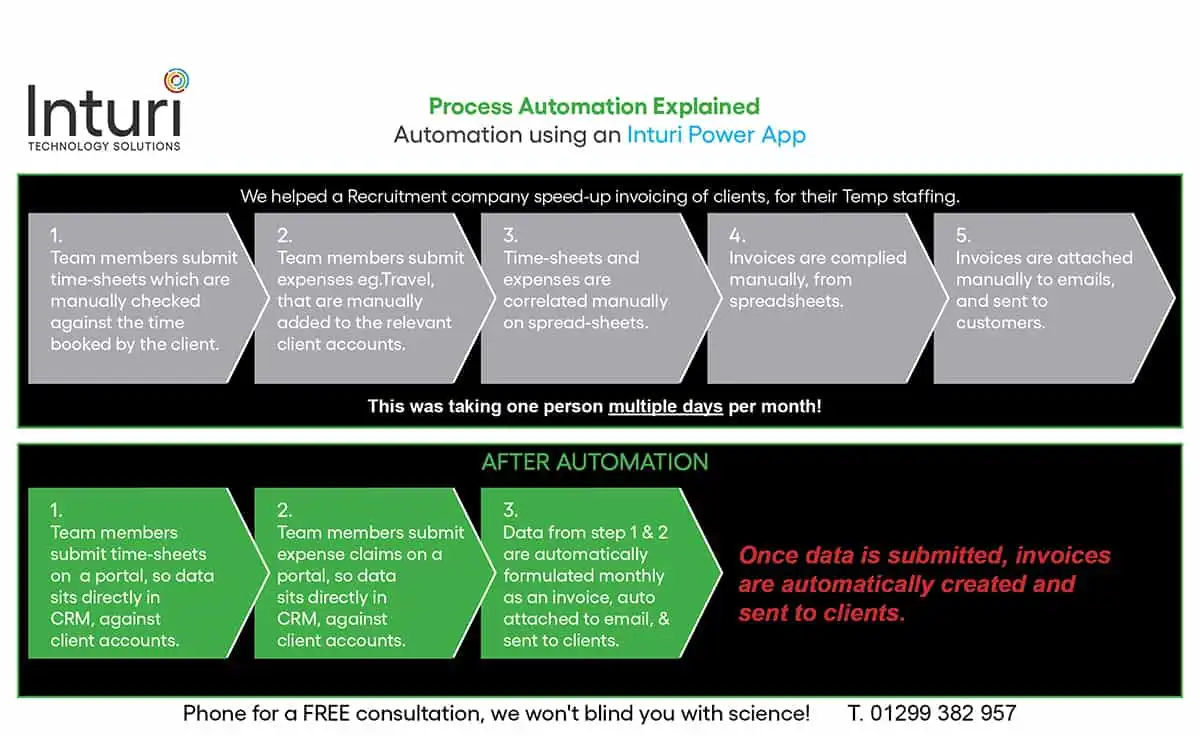
Collating timesheets & expenses for invoicing
The diagram outlines the steps taken to compile invoices for clients, from timesheets and expense claims, for an HR company. Ordinarily, it would take five steps that relied heavily on manual handling, with a massive margin for error. With Power Automate it takes three steps as data handling is dramatically reduced.
MS DYNAMICS 365 OPENS UP AUTOMATION POSSIBILITIES ACROSS THE BOARD
Using MS Dynamics 365 as your platform, with any legacy platforms integrated, will open up automation possibilities across the board as all the sources that are connected are viable. With over 200 connected sources and deep integration with SharePoint, OneDrive for Business, and D365, automation can be used in the context of the applications you use every day.
Tasks governed by rules can be automated, for example, routing the right information to the right person/department. This could be used, for example, for onboarding.
We have recently completed a case study for a client of ours, a Commercial cleaning franchise, that has used automation successfully to trigger sending out a monthly Customer Voice survey to gauge client satisfaction.
Extend your processes
For high-level automation for data-heavy businesses, MS Azure can be used to do the heavy lifting by pushing and pulling data, to collate it to set algorithms. The Insurance and Finance sectors and most Fortune 500 companies have switched to the Azure Functions because of this aspect.
SMB’s should not dismiss this option though, as the Azure License is based on consumption, so you will not be paying enterprise-level prices.
Working with your Inturi consultant will help you consolidate your ideas on what processes can be automated. We are not going to sell you more than you need as we will produce a scoping document with you, which will outline all the solutions you could take advantage of.
If you have further questions and are looking to streamline your processes do give us a call, we will not blind you with science! Chat with Inturi
SHARE POST
TECHNOLOGY CAN RULE YOU OR BE YOUR TOOL
Find out more about your digital CRM solution today.
For further information book a call
Or call us now